
Why Liferay Migration Projects Fail: Common Mistakes and How to Avoid Them
About Author

Rajdip Vekariya

Full-Stack Liferay DXP Certified Developer with expertise in building scalable enterprise applications, leveraging modern web technologies, best practices, and AI-driven solutions to deliver intelligent, secure, and future-ready digital experiences.
October 7, 2026

A Liferay migration can be the turning point for an aging digital platform, or a very expensive headache if approached as a simple version upgrade. Moving to the latest Liferay DXP can bring better scalability, modern user experiences, headless capabilities, and more flexible development options. But the technology is only one part of the equation. Outdated customizations, overlooked integrations, unrealistic timelines, and insufficient testing can quickly derail a migration. The good news? Most of these problems are avoidable with the right planning, assessment, and execution strategy.
Why Successful Liferay Migration Requires More Than a Version Upgrade
It is tempting to think of migration as: install the new version, move the data, and go live.
Enterprise portals rarely work that way.
A Liferay environment can contain years of custom development, workflows, themes, third-party integrations, content, configurations, and business processes. Some may still be essential to daily operations, while others may have been created to solve problems that no longer exist.
That makes Liferay DXP migration an opportunity to reassess the entire digital platform, not simply move everything from one environment to another.
A successful migration starts by understanding the current environment, identifying what should be retained or replaced, reviewing business requirements, and defining where the platform needs to go next. The goal is not to carry every old customization forward. It is to create a cleaner, more scalable, and future-ready environment that supports current and future business needs.
Common Mistakes That Cause Liferay Migration Projects to Fail
-
Skipping Migration Assessment and Business Requirement Analysis
Starting development without understanding the existing portal can create problems later. Years of pages, custom modules, workflows, integrations, themes, and configurations may be difficult to account for without a proper inventory.
Business requirements also matter. If existing processes have changed, migrating everything as-is can simply recreate outdated ways of working on a newer platform.
The better approach: Conduct a migration readiness assessment that covers the portal, business processes, content, workflows, customizations, integrations, and technical dependencies.
-
Poor Migration Planning and Unrealistic Timelines
Migration timelines can quickly become unrealistic when teams underestimate customization, integration, testing, and deployment requirements.
A successful project also needs the right mix of Liferay developers, architects, QA teams, infrastructure teams, and business stakeholders.
The better approach: Break the migration into phases, define milestones and responsibilities, account for dependencies, and include contingency and rollback planning.
-
Ignoring Breaking Changes and Compatibility Issues
Legacy modules, themes, plugins, APIs, and extensions may not work as expected in the target Liferay environment.
Assuming that existing code will simply carry forward can lead to unexpected redevelopment work late in the project.
The better approach: Review custom code, APIs, themes, extensions, and dependencies early and identify components that need modification, replacement, or modernization.
-
Overlooking Enterprise Integrations
Liferay rarely operates as an isolated platform. ERP, CRM, HRMS, SSO/LDAP, APIs, document repositories, and third-party systems may all be connected to the portal.
A change in authentication, API behavior, or data synchronization can affect critical business processes.
The better approach: Create an integration inventory and validate APIs, authentication, data flows, and third-party dependencies throughout the migration.
-
Inadequate Testing Before Production Deployment
A portal loading successfully does not mean the migration is ready for production.
Workflows, permissions, integrations, performance, security, content, and user journeys all need to be validated. An employee may be able to log in, for example, but still be unable to complete an approval workflow.
The better approach: Include functional, regression, integration, performance, security, and User Acceptance Testing before deployment.
-
Neglecting User Experience and Performance Optimization
Migration should not simply move yesterday’s experience onto tomorrow’s technology.
If the existing portal has slow pages, confusing navigation, outdated interfaces, or poor responsiveness, migration provides an opportunity to address those issues.
The better approach: Review UX, responsiveness, personalization, performance, and scalability as part of the migration strategy.
-
Insufficient Go-Live Preparation and Post-Migration Support
Even a well-tested migration can reveal unexpected issues after real users start accessing the platform.
Administrators need to understand the new environment, users need to know about relevant changes, and technical teams need to monitor the platform closely after launch.
The better approach: Prepare a detailed go-live plan, establish monitoring and support processes, train administrators where required, and plan for post-migration stabilization.
Best Practices for a Successful Liferay Migration
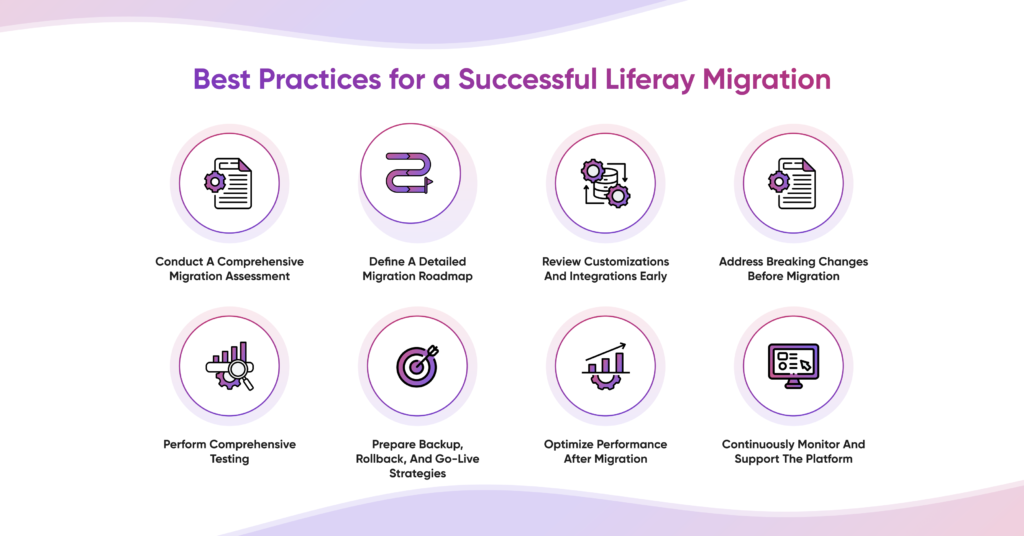
A successful migration is less about moving everything quickly and more about moving the right things in the right way. The following Liferay migration best practices can help organizations reduce technical risk, improve business continuity, and make the most of the new Liferay DXP environment.
-
Conduct a Comprehensive Migration Assessment
Before deciding how to migrate, establish a clear picture of the existing environment.
Start by creating an inventory of sites, pages, content, users, roles, workflows, custom modules, themes, extensions, configurations, APIs, and third-party integrations. This helps the migration team understand the actual scope rather than relying on assumptions.
However, a technical inventory alone is not enough. Business stakeholders should also be involved in identifying which features and workflows are actively used, which are business-critical, and which can be retired.
For example, an organization may discover that a custom workflow built several years ago is no longer needed, while another workflow has become central to daily operations and requires careful modernization.
The assessment should answer three fundamental questions:
- What needs to be migrated?
- What needs to be modernized?
- What can be retired?
This helps reduce unnecessary migration work, improve effort estimates, and prevent legacy technical debt from being carried into the new environment.
-
Define a Detailed Migration Roadmap
Once the current environment is understood, create a migration roadmap that clearly defines how the project will move from the existing platform to the target environment.
The roadmap should cover assessment, architecture, customization updates, integration development, data migration, testing, UAT, deployment, and post-migration stabilization.
For larger enterprise environments, a phased approach can make the process easier to control. A pilot migration can help teams validate the approach with a smaller group of sites, users, or capabilities before expanding to the wider environment.
The roadmap should also define:
- Project milestones and dependencies
- Team responsibilities
- Resource requirements
- Testing cycles
- Deployment windows
- Business continuity requirements
- Rollback criteria
- Communication plans
Most importantly, timelines should be based on the actual complexity discovered during assessment rather than an arbitrary go-live date.
-
Review Customizations and Integrations Early
Customizations and integrations are two areas that can significantly affect migration effort.
Instead of waiting until development is underway, review them during the planning stage.
For customizations, determine whether each component should be retained, redesigned, replaced with standard platform functionality, or retired. This prevents organizations from automatically rebuilding functionality simply because it already exists.
For integrations, create a clear map of connected systems such as ERP, CRM, HRMS, SSO/LDAP, document management platforms, APIs, and third-party services.
Review authentication methods, data dependencies, synchronization requirements, API compatibility, and failure scenarios.
Early analysis gives teams enough time to address complex dependencies before they become blockers.
-
Address Breaking Changes Before Migration
Compatibility should be treated as a planning activity, not a last-minute testing activity.
Review existing modules, APIs, themes, plugins, extensions, and third-party dependencies against the target Liferay environment. Identify deprecated or incompatible components and determine the appropriate remediation strategy.
Some components may need to be redeveloped. Others may be replaced with newer platform capabilities. Some may no longer be necessary.
This is also an opportunity to modernize the technical foundation. Instead of reproducing legacy implementations exactly as they were, teams can adopt current development approaches and create a cleaner architecture.
Addressing these issues early reduces surprises during development and makes future upgrades easier to manage.
-
Perform Comprehensive Testing
Testing should be planned from the beginning of the migration rather than added near the end.
A comprehensive testing strategy should validate the platform from both technical and business perspectives.
Functional testing ensures that portal features, workflows, forms, and business processes work correctly.
Regression testing confirms that existing functionality continues to work after customizations and integrations are migrated.
Integration testing validates communication between Liferay and connected enterprise applications.
Performance testing helps determine whether the platform can handle expected user traffic, content volumes, and business workloads.
Security testing validates authentication, authorization, permissions, and access controls.
And finally, User Acceptance Testing allows business users to validate real-world scenarios.
For example, rather than simply checking whether an employee can access the portal, UAT should validate the complete journey: logging in, finding the right information, submitting a request, routing it to the correct approver, and receiving the expected notification.
This approach helps identify issues that technical testing alone may miss.
-
Prepare Backup, Rollback, and Go-Live Strategies
A migration should always have a defined recovery strategy.
Before production deployment, ensure that relevant data, configurations, and required environments are backed up. Define exactly what conditions would trigger a rollback and who is responsible for making that decision.
Go-live planning should also cover deployment responsibilities, communication, administrator readiness, support contacts, monitoring, and escalation procedures.
For business-critical portals, organizations may choose lower-impact deployment windows to minimize disruption.
Users should also be informed about significant changes to workflows, navigation, or portal functionality.
The objective is to make go-live a controlled transition rather than a high-pressure event where teams are discovering the process as they go.
-
Optimize Performance After Migration
Performance optimization should continue after the migration because real-world usage can reveal issues that controlled testing does not always capture.
Monitor page response times, resource utilization, search performance, integrations, errors, and overall system behavior after launch.
Where possible, compare post-migration performance against a baseline from the existing environment. This makes it easier to identify whether the migration has delivered measurable improvements.
Teams can then address bottlenecks through configuration changes, optimization of custom components, improved caching strategies, infrastructure adjustments, or other appropriate measures.
Performance should ultimately be viewed from the user’s perspective. A technically successful migration that leaves employees, customers, or partners waiting for pages to load has not delivered the full value expected from modernization.
-
Continuously Monitor and Support the Platform
The migration does not end when the new environment goes live.
The post-migration period should become the foundation for continuous platform improvement.
Monitor system health, user behavior, search patterns, workflow performance, support requests, and integration reliability. These insights can reveal where the portal needs further refinement.
For example, if users repeatedly search for information that is difficult to locate, the organization may need to improve information architecture or content organization. If a workflow consistently receives support requests, it may need redesign or automation.
Ongoing support also keeps the platform ready for future upgrades and business changes.
Rather than allowing another layer of technical debt to build up, organizations can maintain a regular cycle of monitoring, optimization, enhancement, and platform updates.
The best migrations are therefore not simply the ones that successfully move content and code. They are the ones that leave the organization with a better, cleaner, and more capable platform than it started with.
Why Choose Aixtor for Liferay Migration Services
A successful migration requires platform expertise, technical planning, quality assurance, integration knowledge, and an understanding of business continuity.
Aixtor approaches Liferay Migration Services as a structured modernization initiative rather than a simple technical upgrade.
Our approach can include:
- Migration requirements analysis
- Migration planning and strategy
- Existing portal and customization assessment
- UI/UX modernization
- Portal migration execution
- Enterprise integration validation
- Quality assurance and comprehensive testing
- Production deployment support
- Minimal-downtime migration approach
- Post-migration optimization and support
With certified Liferay expertise and experience across enterprise digital platforms, Aixtor helps organizations navigate migration complexities while keeping business continuity and long-term scalability in focus.
Whether the requirement is a version migration, portal modernization, complex integration, or broader digital transformation initiative, the objective is to make the transition more predictable and the resulting platform more future-ready.
Conclusion
A successful Liferay migration is about much more than moving from one version to another. It requires a clear understanding of the existing environment, realistic planning, compatibility reviews, integration validation, comprehensive testing, and continuous optimization. While common migration mistakes can create unnecessary risks, a structured approach can turn migration into an opportunity to modernize the entire digital platform. By reviewing customizations, strengthening integrations, improving performance, validating real user journeys, and planning for continuous support, organizations can get greater value from the latest Liferay DXP. Aixtor Technologies helps enterprises plan, execute, test, and optimize Liferay migrations with expert consulting and post-migration support.
Latest Blogs
Stay up to date with the latest insights, trends, and best practices in enterprise portal development and digital transformation.


